| Filename | Latest commit message | Latest commit date |
|---|---|---|
 77353e7f31
* Update GLFW to 3.5.1 * Remove cocoa_time.c from rglfw.c * Add macos_time.c to rglfw.c * Redo changes from pull request #3863 * Makefile: add QuartzCore framework when building for macOS * Add QuartzCore when building for macOS to other build files * Remove unused GLFW dependencies |
||
| .. | ||
| compiler_settings.png | ||
| core_basic_window.c | ||
| core_basic_window.cbp | ||
| README.md | ||

raylib template for Code::Blocks
- Install raylib.
On Windows you should install the Windows Installer (with MinGW compiler) package. On other platforms you can install however you like following the instructions in the wiki.
* https://github.com/raysan5/raylib/releases/download/4.2.0/raylib_installer_v420.mingw.exe
* https://github.com/raysan5/raylib/wiki/Working-on-GNU-Linux
* https://github.com/raysan5/raylib/wiki/Working-on-macOS
-
Install and run Code::Blocks.
-
Windows only: Select
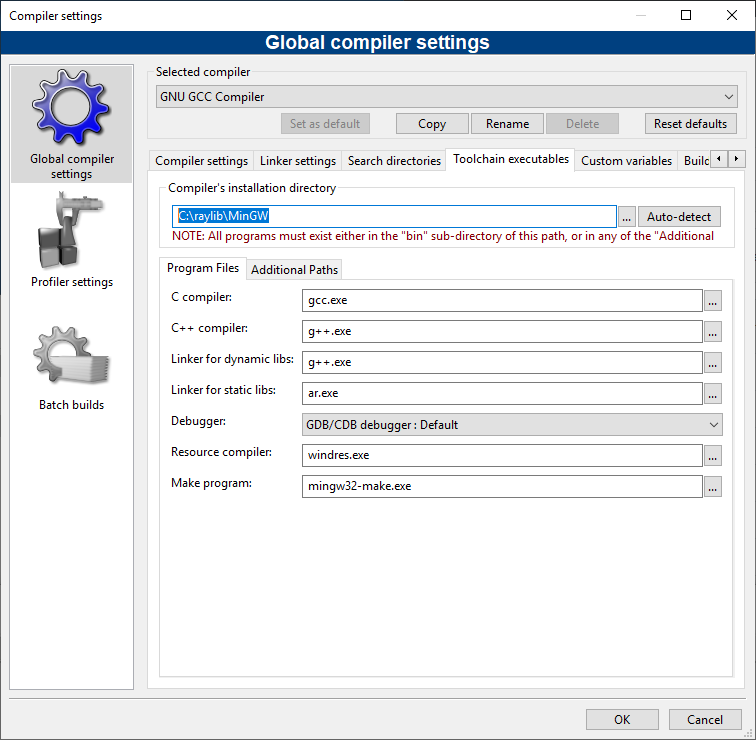
SettingsCompilerToolchain executables. ChangeCompiler's installation directorytoC:\raylib\MingGW. Do not press auto-detect. There is a screenshot below showing how it should look. PressOK. -
Select
FileOpenand open thecore_basic_windows.cbpfile.
For an example with resources, see https://github.com/electronstudio/raylib-game-template-codeblocks